Oxidized is a great tool for automating backups of device configs like ASA Firewalls, IOS routers, and all types of switches! I chose Oxidized because it very easy integrates into Librenms.
The instructions for how to integrate oxidized into LibreNMS are below:
go to the working directory
cd /root/
install ruby and crap
sudo yum -y install nano cmake sqlite-devel openssl-devel libssh2-devel ruby gcc ruby-devel
install oxidized
sudo gem install oxidized
sudo gem install oxidized-script oxidized-web
run oxidized twice to generate config files
oxidized
oxidized
edit the config file
nano /root/.config/oxidized/config
contents of the config file
---
username: username
password: password
model: junos
interval: 3600
use_syslog: false
debug: false
threads: 30
timeout: 20
retries: 3
prompt: !ruby/regexp /^([\w.@-]+[#>]\s?)$/
rest: 127.0.0.1:8888
next_adds_job: false
vars: {}
groups: {}
models: {}
pid: /root/.config/oxidized/pid
input:
 default: ssh, telnet
 debug: false
 ssh:
  secure: false
output:
 default: git
 file:
 directory: /root/.config/oxidized/configs
output:
 default: git
 git:
 user: Oxidized
 email: [email protected]
 repo: "/var/lib/oxidized/devices.git"
source:
 default: csv
 csv:
 file: /root/.config/oxidized/router.db
 delimiter: !ruby/regexp /:/
 map:
 name: 0
 model: 1
 username: 2
 password: 3
 vars_map:
 enable: 4
 gpg: false
model_map:
 cisco: ios
 juniper: junos
 hp: procurve
Generate the router.db file which will house our passwords
nano /root/.config/oxidized/router.db
contents of the file
#Firewalls
 10.0.0.1:asa:admin:pass:enablepass
#Switches
10.0.0.8:hp:manager:pass
run oxidized
oxidized
You should see this
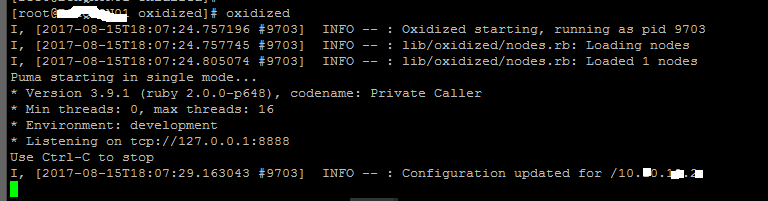
Now let’s configure it to run as a service
note: You should check your version of oxidized, the latest as of right now is 0.20.0
sudo cp /usr/local/share/gems/gems/oxidized-0.20.0/extra/oxidized.service /lib/systemd/system/
Now edit this file we created. Edit the user to be “root” and save it.
nano /lib/systemd/system/oxidized.service
Now let’s reload systemctl and start up the service
sudo systemctl daemon-reload

sudo systemctl enable oxidized.service

sudo systemctl start oxidized

sudo systemctl status oxidized
Status should show:

In LibreNMS my config for Oxidized (Gear Icon | Global Settings | External Settings| Oxidized Integration)
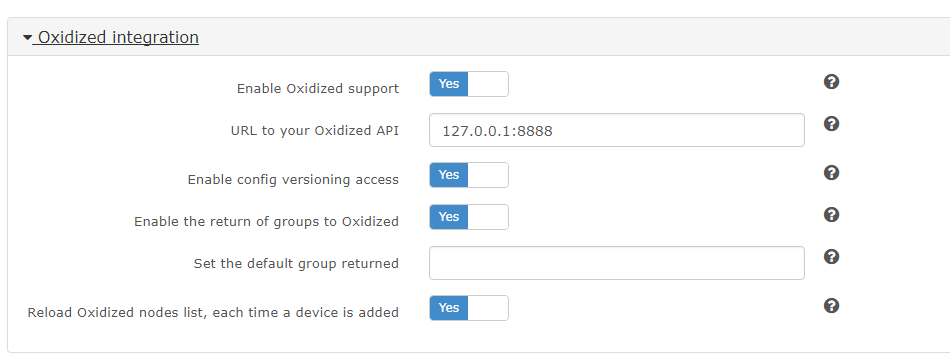
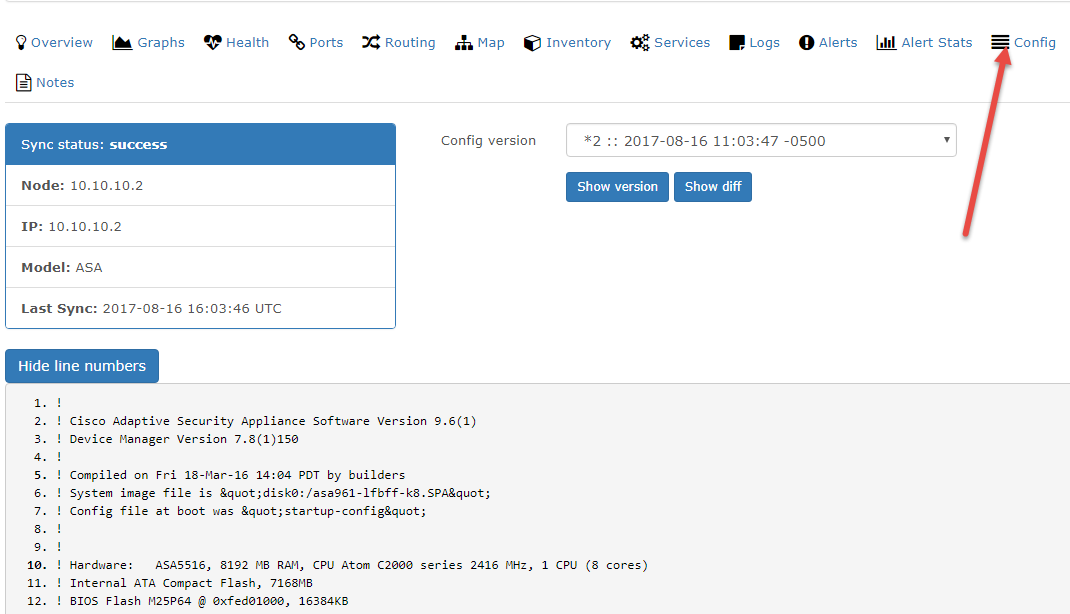
As of right now you should see a “Config” tab per device, and a config saved for the devices we added to router.db.
We can see here that my device config is saved.
Documents I referenced when creating this:
http://packetpushers.net/install-oxidized-network-configuration-backup/
https://docs.librenms.org/Extensions/Oxidized/
If you’re interested in installing nagios plugins for librenms to enable services, click here