You’re here because you need Docling working with OpenWeb-UI or you noticed that Docling is not really using the GPU you have. Docling consumes a decent amount of CPU cycles while the GPU remains at 0% utilization. The only OCR engine that supports GPU acceleration is RapidOCR, but that uses ONNX Runtime in the backend with out GPU acceleration. And even if you did install the ONNX Runtime with GPU acceleration, it doeesn’t seem to work well at all.
The solution is simple, change the RapidOCR backend to Torch, which more effectively uses the GPU.
I’ve deployed Docling-Serve via the official containers.
Here’s the one-shot command to deploy it via docker:
NOTE that I am passing GPU #1, the second GPU into the container via –gpus ‘”device=1″‘. You may need to change that to 0 or just all.
docker run -d -p 5001:5001 \
  -e DOCLING_SERVE_ENABLE_UI=true \
  -e DOCLING_SERVE_ENABLE_REMOTE_SERVICES=true \
  -e DOCLING_SERVE_ENG_LOC_NUM_WORKERS=2 \
  -e OMP_NUM_THREADS=4 \
  -e MKL_NUM_THREADS=4 \
  -e DOCLING_SERVE_MAX_SYNC_WAIT=600 \
  -e UVICORN_WORKERS=1 \
  --gpus '"device=1"' \
  -e DOCLING_DEVICE="cuda:0" \
  -e DOCLING_SERVE_ALLOW_CUSTOM_OCR_CONFIG=true \
--name docling \
--restart always \
  quay.io/docling-project/docling-serve-cu130:v1.25.0
Here’s the OpenWeb-UI config:
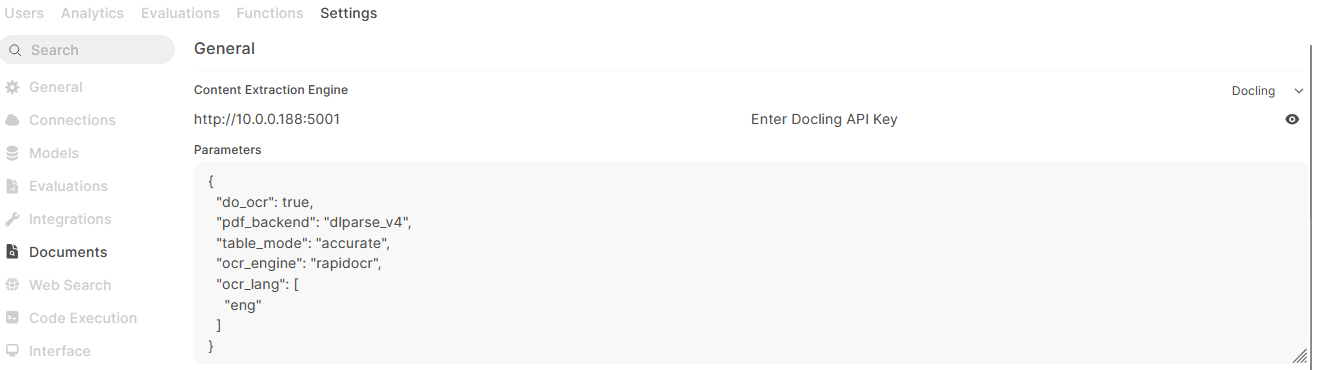
Use these values for the parameters:
{
  "do_ocr": true,
  "pdf_backend": "dlparse_v4",
  "table_mode": "accurate",
  "ocr_engine": "rapidocr",
  "ocr_lang": [
    "eng"
  ]
}
This next part is the actual fix so that RapidOCR uses the Torch backend. If you don’t do this, the GPU will not be used.
docker exec -u root docling bash -c '
# 1: Install CUDA-capable ONNX Runtime
pip uninstall -y onnxruntime && pip install --no-cache-dir onnxruntime-gpu

# 2: Disable the onnxruntime path so torch is selected instead
sed -i "s/import onnxruntime/import onnxruntime_disabled/" \
  /opt/app-root/lib/python3.12/site-packages/docling/models/stages/ocr/auto_ocr_model.py

# 3: Enable CUDA in RapidOCR torch config
sed -i "/^    torch:/,/^    tensorrt:/ s/use_cuda: false/use_cuda: true/" \
  /opt/app-root/lib/python3.12/site-packages/rapidocr/config.yaml
'
docker restart docling